Analysis Agents
Aetheris uses 10 specialized AI agents that work together to analyze your code.
Agent Architecture
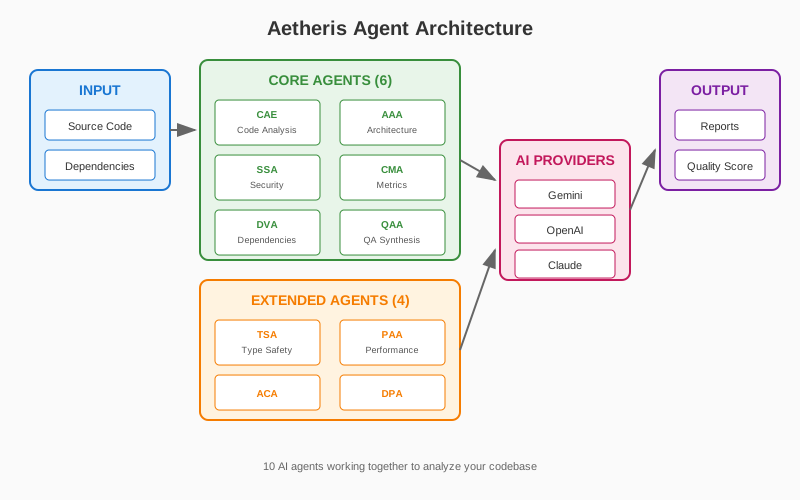
Agent Overview
Core Agents (6)
| Agent | Abbreviation | Purpose |
|---|---|---|
| Code Analysis Expert | CAE | Individual file analysis |
| Architect Analysis Agent | AAA | Architecture overview |
| Security Analysis Agent | SSA | Vulnerability detection |
| Code Metrics Agent | CMA | Code metrics and complexity |
| Dependency Vulnerability Agent | DVA | CVE scanning |
| Quality Assurance Agent | QAA | Final synthesis |
Extended Agents (4) - v2.10+
| Agent | Abbreviation | Purpose |
|---|---|---|
| Type Safety Agent | TSA | Type safety issues, any usage |
| Performance Analysis Agent | PAA | O(n²), N+1 queries, memory leaks |
| API Contract Agent | ACA | REST violations, breaking changes |
| Data Privacy Agent | DPA | PII logging, GDPR/HIPAA compliance |
Code Analysis Expert (CAE)
Analyzes each file individually to identify:
- Objectives: Main purpose and functions
- Strengths: Good practices and patterns
- Dependencies: Relationships between files
- Risks: Technical debt and issues
- Suggestions: Improvement recommendations
Architect Analysis Agent (AAA)
Produces architecture-level analysis:
- Overview: Global system structure
- Patterns: Architectural patterns identified
- Cohesion: Inter-module consistency
- Dependencies: Coupling and dependencies
- Refactoring: Optimization plan
Security Analysis Agent (SSA)
Detects security vulnerabilities:
- Injections: SQL, XSS, command injection
- Secrets: Hardcoded credentials and keys
- Cryptography: Weak crypto implementations
- Authentication: Auth/authz issues
- CWE/OWASP: Standard classifications
Code Metrics Agent (CMA)
Calculates code metrics:
- Complexity: Cyclomatic complexity
- Duplication: Code clone detection
- Nesting: Depth of nested blocks
- Maintainability: Maintainability index
- Size: Lines of code, functions count
Dependency Vulnerability Agent (DVA)
Analyzes dependency vulnerabilities via OSV API:
- npm: package.json, package-lock.json
- PyPI: requirements.txt, Pipfile
- Pub: pubspec.yaml (Dart/Flutter)
Identifies: - CVE identifiers - Severity levels - Fixed versions available
Runtime Environment: DVA parses manifest files (package.json, requirements.txt, pubspec.yaml) and lockfiles directly without requiring package managers (npm, pip, flutter) to be installed. Dependency resolution is performed by reading the lockfile contents and querying the OSV API. If no lockfile is present, only direct dependencies from the manifest are analyzed.
Quality Assurance Agent (QAA)
Synthesizes all analyses:
- Quality Score: Global score (0-100)
- Dimensions: Security, Maintainability, Architecture
- Action Plan: Prioritized improvements
- Roadmap: Improvement timeline
Extended Agents (v2.10+)
Type Safety Agent (TSA)
Detects type safety issues in TypeScript, Python, and Java:
- Any Usage: Detects use of
any,Any, or untyped variables - Unsafe Casts:
as any,# type: ignore, type assertions - Type Ignores:
@ts-ignore,@ts-nocheck,# type: ignore - Null Safety: Missing null checks, optional chaining issues
Supported Languages: TypeScript, Python, Java, JavaScript
Performance Analysis Agent (PAA)
Detects performance anti-patterns:
- O(n²) Complexity: Nested loops on same collection
- N+1 Queries: Database queries inside loops
- Memory Leaks: Unclosed resources, event listeners
- Blocking Async: Sync operations in async context
- Inefficient Operations: String concatenation in loops
Output: performance_report.md
API Contract Agent (ACA)
Detects REST API design issues:
- HTTP Method Violations: GET with body, wrong methods
- REST Naming: Verbs in URLs, inconsistent naming
- Breaking Changes: Removed fields, type changes
- Undocumented Endpoints: Missing OpenAPI annotations
Supported Frameworks: Express, NestJS, FastAPI, Spring, Flask
Data Privacy Agent (DPA)
Detects data privacy and compliance issues:
- PII Logging: Sensitive data in logs
- Missing Encryption: Unencrypted sensitive data
- Insecure Storage: localStorage, cookies without httpOnly
- Compliance: GDPR, HIPAA, PCI-DSS, CCPA violations
Compliance Frameworks:
| Framework | Focus Areas |
|---|---|
| GDPR | Email, name, phone, address, IP |
| HIPAA | SSN, medical records, health data |
| PCI-DSS | Credit cards, CVV, cardholder data |
| CCPA | Email, name, financial data |
Configuration:
Data Security
Before sending code to external AI providers, Aetheris applies automatic sensitive data filtering to protect secrets and intellectual property.
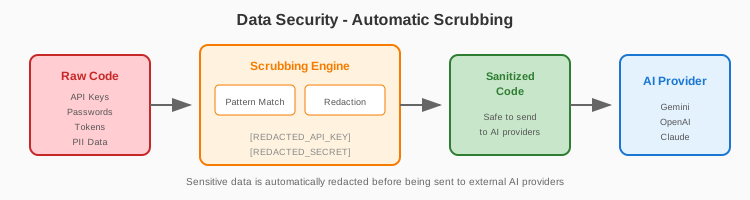
Pre-processing (Scrubbing)
The following data types are automatically masked before AI analysis:
| Data Type | Pattern Examples | Replacement |
|---|---|---|
| API Keys | AKIA..., sk-..., ghp_... | [REDACTED_API_KEY] |
| Passwords | password=, pwd=, secret= | [REDACTED_SECRET] |
| Connection Strings | mongodb://, postgres:// | [REDACTED_CONNECTION_STRING] |
| Private Keys | -----BEGIN RSA PRIVATE KEY----- | [REDACTED_PRIVATE_KEY] |
| JWT Tokens | eyJ... (base64 JWT format) | [REDACTED_TOKEN] |
| AWS Credentials | aws_access_key_id, aws_secret_access_key | [REDACTED_AWS_CREDENTIAL] |
| PII Patterns | Email addresses, phone numbers | [REDACTED_PII] |
Configuration
Control sensitive data filtering via config.json:
{
  "security": {
    "scrub_secrets": true,
    "custom_patterns": [
      {
        "name": "internal_token",
        "pattern": "MYCOMPANY_[A-Z0-9]{32}",
        "replacement": "[REDACTED_INTERNAL_TOKEN]"
      }
    ],
    "exclude_files": ["**/*.env", "**/secrets/**"]
  }
}
Best Practices
- Never commit secrets - Use
.envfiles excluded from analysis - Review before analysis - Check what files will be sent to AI
- Use
--dry-run- Preview analysis scope without sending data - Custom patterns - Add company-specific secret formats to config
- Audit logging - Enable
audit_log_pathto track all AI interactions
File Exclusions
By default, these files are excluded from AI analysis:
.env,.env.*- Environment files**/secrets/**- Secret directories**/*.pem,**/*.key- Certificate files**/credentials*- Credential files
How Agents Work
Analysis Process
Each agent performs a multi-step analysis:
- Initial Scan - Quick identification of potential issues
- Deep Analysis - Detailed examination of flagged areas
- Cross-Reference - Correlation with other agent findings
- Synthesis - Final prioritized recommendations
Output Quality
All agents produce structured findings with:
| Element | Description |
|---|---|
| Severity | Critical, High, Medium, Low |
| Location | File path and line numbers |
| Description | Clear explanation of the issue |
| Recommendation | Actionable fix suggestion |
| References | CWE, OWASP, or best practice links |
Extending Aetheris
Aetheris supports custom agents through its plugin system. See the Plugin Guide for details on:
- Creating custom analysis agents
- Registering hooks into the workflow
- Building specialized analysis pipelines
Related Documentation
- Features - Full feature reference
- Configuration - Customizing agent behavior
- Troubleshooting - Common issues and solutions